Reply to a conference invitation by thanking the sender, confirming attendance, and sharing needed details like role or dates. If unable to join, politely decline while showing appreciation for the opportunity. Keep the response clear and respectful.
If you’re thinking about what to write or how to say it right, you’re not alone. Many people feel unsure when replying to formal invites like these. In this article, you’ll find everything you need to know, including tips, examples, tone, and the exact details to include in your message.
Checklist Before You Reply a Conference Invitation
Replying to a conference invitation becomes much easier when you review a few key details first. This checklist helps you avoid mistakes, confirm important information, and respond with confidence. Before you accept, decline, or request more details, go through these points to make sure your message is clear, accurate, and professional. Here’s a checklist to help you:
Confirm the Event Details
Date and time
Location or virtual platform
Duration of the event
Agenda or theme
Understand Your Role
Are you attending, speaking, presenting, or representing an organization?
Do you need to prepare a talk, slides, or materials?
Check Your Schedule

Verify availability on event dates
Ensure no conflicting commitments
Review Travel and Budget Requirements
Will you need flights, accommodation, or meals?
Is funding required or provided?
Do you need approval from your employer or department?
Identify Any Information You Still Need
You may need to ask the organizer about:
Registration fees
Session format (panel, keynote, workshop)
Audience type
Expected deliverables
Check Visa or Documentation Needs (For International Events)
Do you require a visa invitation letter?
Do you need passport details ready?
Are there deadlines for processing?
Clarify Technical Requirements (For Virtual or Hybrid Events)
Platform (Zoom, Teams, Webex, etc.)
Slide format or file requirements
Audio and video setup
Time zone confirmation
Decide the Tone of Your Reply
Formal
Professional
Friendly
Choose based on the nature of the event and the relationship with the organizer.
Prepare Your Information for the Reply
Make sure you have ready:
Correct spelling of your name
Job title and organization
Presentation title (if applicable)
Contact information
Use AI Tools to Polish Your Reply
Check spelling and grammar with tools like Grammarly
Read the updated text to make sure it sounds natural
Remove words that feel too hard or not needed
Make sure the message is short and clear
Check if the tone feels friendly and polite
Use AI Tools to Polish Your Reply
Check spelling and grammar with tools like Grammarly
Read the updated text to make sure it sounds natural
Remove words that feel too hard or not needed
Make sure the message is short and clear
Check if the tone feels friendly and polite
Make sure to double-check your writing while using AI, and don’t rely just on it.
Respond Promptly
Ideally within 24–72 hours
If late, acknowledge the delay politely
How to Reply to a Conference Invitation?
Start the reply by thanking the organizer. Clearly say yes or no, confirm the date, place, and your role. Share any details they asked for, like your bio, slides, or travel info. Ask short questions if needed, and end with thanks or a reply deadline. Here are how to accept an invitation formally examples and templates:

The Decision Tree for Replying to a Conference Invitation
This part helps you choose the right type of reply before you pick a template. It makes the whole process simple and clear.
First, think about your role.
Are you going as an attendee, or are you invited as a speaker. Your role decides the kind of reply you should send.
Next, check if you can attend on the given date.
If you are free and want to join, you can move forward with an acceptance reply.
If you are busy or not able to join, then a polite decline is the right choice.
Now think about travel needs.
If the event is in another country, ask yourself if you need a visa or an invitation letter. If yes, you may need to ask for those details before you fully confirm.
Then check if you have all the needed information.
Do you know the session time, place, and your role.
Do you know if travel, stay, or payment is covered.
If anything is not clear, send a short message to ask before saying yes or no.
After this, pick the right template.
If everything is clear and you are attending, use an acceptance template.
If you are speaking, use the speaker acceptance template.
If you need more details, use the request for more info template.
If you cannot join, choose one of the decline templates.
Templates for Acceptance Reply
Here are how to accept an invitation formally examples and templates:
Accept (attendee, short):
Subject: RSVP — [Conference Name]
Hi [Name], thanks for the invitation. I’m happy to confirm my attendance on [date] at [location].
Please let me know the process for sharing dietary or accessibility needs!
Best,
[Full Name], [Title], [Org]
Accept (speaker):
Subject: Speaking Confirmation — [Conference Name]
Dear [Name], thank you for the invitation. I’m pleased to confirm as a speaker.
Attached: bio (100 words) + headshot. I’ll bring slides (HDMI).
Please let me know the process for sharing dietary or accessibility needs.
Best regards,
[Name] | [Talk Title]
Templates for More Info.
Request more details before deciding:
Subject: Clarifying Details — [Conference Name]
Hi [Name], thanks for inviting me. Before I confirm, could you please share
(1) session date/time, (2) travel/accommodation policy, (3) honorarium (if any)?
I’ll confirm by [date].
Thanks again,
[Name]
Templates for Declining an Invitation
Decline (attendee):
Subject: Regrets — [Conference Name]
Dear [Name], thank you for the kind invitation. I’m unable to attend on [date] due to a prior commitment.
Wishing you a successful event, and please keep me posted on future editions.
Warm regards,
[Name]
Decline (speaker):
Subject: Unable to Speak — [Conference Name]
Dear [Name], I’m honored by the invitation, but I can’t commit to [date].
If helpful, I can recommend [Alt Speaker]. I’d love to explore a future edition.
Thank you again,
[Name]
A proper reply to a conference invitation is quite important. It doesn’t matter if you accept the invite or not. Using a fixed template is the easiest possible solution if you don’t know how to reply for invitation. But there is always something missing in these fixed template mail replies, and it is usually a personal touch.
Writing a Proper Conference Invitation Reply
Replying to a conference invitation is more than just sending a quick yes or no. The way you respond to invitation shows professionalism, respect, and interest in the event. A well-written reply not only confirms your decision but also makes communication easier for the organizers. Below are some best practices to help you craft a clear, polite, and effective response:
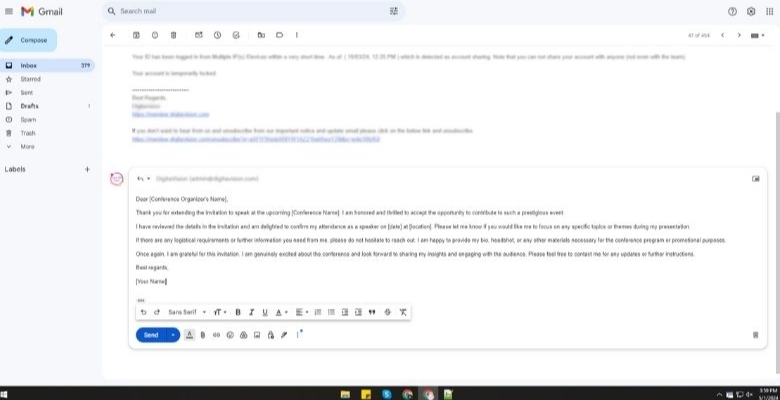
Say Thank You First
It’s good to begin your message with a quick thank-you note. A kind reply helps you sound respectful and polite from the start. You can write something simple like, “Thank you for inviting me to the conference.” This shows that you’re happy to receive the invitation and that you value their time. A nice start always creates a better impression and tone.
Mention Your Decision
Letting them know your answer clearly is the next important step. You can say that you will attend or that you will not. Don’t make it confusing—just give a clear yes or no. If you’re joining, a short line like “I’ll be attending the event” works well. For example, when confirming for upcoming conferences in Canada, stating your intent early helps organizers prepare schedules, arrange resources, and manage the guest list smoothly. This simple step saves everyone’s time and effort.
Share Basic Details
Giving your full name and any needed info can be helpful too. Sometimes, the organizer may need your phone number or country name. You don’t have to write a lot, just the important parts. If they asked for anything in the invite, make sure to include it. When you do this, it becomes easier for them to prepare for your arrival.
Ask Any Questions
You can ask a few simple questions if something is unclear to you. Maybe you need to know the dress code or the food menu. Or you’re unsure if you need to bring anything for the event. You can also ask if your name is listed correctly. These kinds of questions help you avoid problems later and keep things smooth.
Mention the Letter
In some cases, especially for international events, you might have received a conference invitation letter with your name on it. If you have any concerns or questions about that, this is a good place to bring them up lightly. You can say something like, “I’ve received the conference invitation letter and just wanted to check if I need to bring a copy to the venue.”
Keep It Polite
It’s always best to sound kind and polite in every reply. Even if you are saying no, use gentle words in your message. Try things like “I’m grateful for the chance” or “Thanks for inviting me.” Words like these help you sound calm and friendly. A polite message helps leave a good feeling and shows you have good manners.
Show Excitement
If you are going to attend, it’s nice to show happiness. You can say things like “I look forward to joining the conference sessions” easily. This shows that you care about the event and are interested. The organizers will also feel good when they see that you are excited. Your message becomes more positive when you add a happy tone.
Personal Touch
You can also say what you are looking forward to at the event. This could be a speaker, a topic, or a special session. For example, you might say you are excited to hear a guest speaker or learn about a certain subject. This makes your reply feel more personal and helps build a friendly connection with the organizer.
Confirm Quickly
Try to send your reply as soon as you can. Waiting too long might confuse the organizers who are doing the planning. Once you know your answer, write your message and hit send. Being on time with your reply helps everyone stay on track. It also shows that you are responsible and respect the time of others.
Close With Thanks
A short and polite thank you at the end is always great. You can simply say “Thank you again for the invite” or something similar. This leaves a good final feeling after they read your reply. Ending kindly shows that you’re respectful, even if you cannot attend. It’s a small touch, but it matters a lot in every reply.
Email Templates for Real-Life Conference Reply Scenarios
Conference invitations vary, so one simple reply template rarely works for every situation. Whether you’re accepting, declining, asking for details, or confirming as a speaker, these real-life templates help you respond professionally and clearly. Each one is ready to copy, customize, and use for any type of event—virtual, hybrid, or in person.
Formal Acceptance Email
Subject: Confirmation of My Participation
Dear [Name],
Thank you for inviting me to the [Conference Name]. I am pleased to confirm my attendance on [Date].
Please let me know if any documents, registration steps, or additional information are required from my side.
I look forward to participating.
Warm regards,
[Your Name]
Friendly Acceptance Email
Subject: Excited to Join the Conference!
Hi [Name],
Thanks so much for the invitation! I’m happy to confirm that I’ll attend the [Conference Name] on [Date].
Let me know if there’s anything you need before the event.
Best,
[Your Name]
Acceptance With Questions
Subject: Confirmation + Few Questions
Hello [Name],
Thank you for the invitation. I would like to confirm my participation in the [Conference Name].
Before finalizing arrangements, could you please clarify:
The event schedule
Registration requirements
Expected session format
Thank you in advance.
Best regards,
[Your Name]
Requesting More Information Before Confirming
Subject: Request for Additional Details
Dear [Name],
Thank you for inviting me to the [Conference Name]. Before I confirm, I would appreciate details about the agenda, expected contribution, and any fees or travel arrangements involved.
This will help me finalize my decision.
Warm regards,
[Your Name]
Speaker Confirmation Email
Subject: Speaker Confirmation for [Session Title]
Dear [Name],
Thank you for selecting me as a speaker for the [Conference Name]. I gladly confirm my participation.
Here are the requested details:
Presentation title: [Title]
Short bio: [Bio]
Technical needs: [List]
Please let me know the slide submission deadline and session duration.
Best regards,
[Your Name]
Asking for a Visa Invitation Letter
Subject: Request for Visa Invitation Letter
Dear [Name],
Thank you for the invitation to the [Conference Name]. I would be happy to attend and would like to request a visa invitation letter.
Below are my required details:
Full name
Passport number
Nationality
Intended travel dates
Please let me know if you need anything else.
Sincerely,
[Your Name]
Requesting Travel Funding or Accommodation Support
Subject: Inquiry About Travel Support
Hello [Name],
Thank you for inviting me to participate in the [Conference Name]. I am interested in attending but would like to inquire whether travel funding or accommodation support is available for participants/speakers.
Any information would be greatly appreciated.
Best regards,
[Your Name]
Accepting Partial Attendance
Subject: Confirmation for Partial Attendance
Dear [Name],
Thank you for the invitation. I am able to attend the conference on [Dates/Session], but unfortunately cannot join the full event.
Please let me know if partial attendance is acceptable.
Kind regards,
[Your Name]
Declining Politely
Subject: Thank You for the Invitation
Dear [Name],
Thank you for inviting me to the [Conference Name]. Unfortunately, I am unable to participate due to prior commitments.
I appreciate the opportunity and hope to join future events.
Warm regards,
[Your Name]
Replying Late With an Apology
Subject: Apologies for the Delay — Conference Response
Dear [Name],
My sincere apologies for the delayed response. Thank you for your patience.
I would like to [confirm/decline] my participation in the [Conference Name].
Please let me know if any further action is needed.
Best regards,
[Your Name
How to Reply to a Conference Invitation on LinkedIn?
When someone invites you to a conference on LinkedIn, your reply should be polite, clear, and show that you appreciate the invite. Keep the message friendly and mention the conference name or topic briefly so they know you understood the invitation. You can also ask a simple question if you need more details.
Message Structure
Greeting and thanks: Start by saying thank you for the invitation.
Confirm interest or attendance: Let them know if you plan to attend or if you need more info.
Add a specific detail: Mention something about the conference or your reason for attending.
Close politely: End with a friendly line and your name.
Example Replies
If you plan to attend
Hi [Name],
Thanks a lot for the invite to [Conference Name]. I’m excited to join and learn more about [topic]. Looking forward to seeing the event details.
Best, [Your Name]
If you want more information
Hello [Name],
Thank you for the conference invitation. Could you please share the schedule or agenda? I’d love to know more before I confirm.
Kind regards, [Your Name]
If you can’t attend right now
Hi [Name],
Thank you for inviting me to [Conference Name]. Unfortunately I can’t join at this time. Please keep me in mind for future events.
Warm regards, [Your Name]
These tips help you reply professionally and keep doors open for networking or future invitations.
Best Practices of Replying to a Conference Invitation
Responding to a conference invitation promptly and professionally shows respect for the organizer and ensures smooth planning. Follow these best practices to keep your message clear and effective, whether you’re accepting a conference invitation, declining, or requesting more information.
Reply within 48–72 hours of receiving the invitation.
Mirror the tone and channel used in the invite (email, LinkedIn, etc.).
Clearly restate event details: date, location, and your role.
Include all requested information (bio, headshot, presentation title).
Ask specific, relevant questions early (AV, travel, dress code).
Keep your message brief—3–5 short paragraphs or less.
Use a polite, warm tone even when declining.
Avoid slang or overly casual language.
Confirm any agreed travel, fees, or materials in writing.
Close with thanks and an offer for future collaboration.
Common Mistakes When Replying to a Conference Invitation (and How to Fix Them)
Even small errors in your reply to a conference invitation can create confusion, delays, or a poor impression. From vague answers to missed details, these mistakes are easy to make and just as easy to fix. Here’s how to avoid them and respond with clarity and professionalism:
Replying too late
Why it hurts: It looks unprofessional and complicates planning.
Fix: Respond within 48–72 hours; if undecided, give a decision date.
Use this: “Thank you for the invitation. I’m confirming details on my end and will give you a final answer by [date].”
Being vague (“maybe”, “sounds good”)
Why it hurts: Organizers need a clear yes/no.
Fix: State your decision or a firm deadline to confirm.
Use this: “Yes—happy to attend on [date] at [location].” or “I’ll confirm availability by [date].”
Over-casual tone
Why it hurts: Diminishes credibility.
Fix: Professional voice; complete sentences; avoid slang.
Use this: “Hi [Name], thank you for the invitation. I’m pleased to confirm my attendance.”
Burying the Decision Deep in the Email
Why it hurts: Readers miss the most important line.
Fix: Lead with your decision in the first sentence.
Use this structure: Decision → Logistics → Requests → Thanks.

Forgetting Key Logistics
Why it hurts: invites back-and-forth and mistakes.
Fix: restate date, location (or virtual platform), and role in your reply.
Use this: “I’m confirming as [role] for [Conference] on [date], [city/venue or platform].”
Ignoring Requested Materials (Bio, Headshot, Slides)
Why it hurts: Delays programs and credentials.
Fix: Attach what was asked; mention the attachments explicitly.
Use this: “I’ve attached a 100-word bio and headshot (300×300). Slides will follow by [deadline].”
Asking Broad or Multiple Unfocused Questions
Why it hurts: Slows responses.
Fix: Ask 2–3 specific questions in bullets.
Use this:
Could you confirm:
Session time and room?
AV: HDMI input available?
Slide deadline?”
Clumsy Travel/Honorarium Discussions
Why it hurts: Can read as transactional or presumptive.
Fix: Ask neutrally about policy before committing to bookings.
Use this: “Could you share the travel/accommodation policy and any honorarium details so I can plan accordingly?”
Missing Visa/Invitation-letter Needs (international)
Why it hurts: Tight timelines jeopardize attendance.
Fix: Request the letter early and provide the required fields.
Use this: “I’ll need an invitation letter for visa processing. Details: full passport name, number, nationality, DOB, address.”
Weak or Generic Subject Lines
Why it hurts: Gets lost in busy inboxes.
Fix: Make the subject specific to the action.
Use one of these:
RSVP — [Conference Name]
Speaking Confirmation — [Conference Name]
Clarifying Details — [Conference Name]
Regrets — [Conference Name] (Unable to Attend)
Invitation Letter Request — [Conference Name]
Reply-all Misfires & Wrong Channel
Why it hurts: Exposes emails, creates noise, and privacy risk.
Fix: Reply only to the organizer unless told otherwise; match the invite’s channel (email ↔ email, etc.).
Use this: “I’ve trimmed recipients to keep this thread focused; happy to loop others as needed.”
No follow-up When the Organizer Goes quiet
Why it hurts: Stalls logistics.
Fix: One polite nudge after 5–6 days; then wait before a final check-in.
Use this: “Just checking whether you saw my note below—happy to confirm once I have the session time and AV details.”
Quick “Fix-It” Checklist
Lead with a clear Yes/No (or confirm-by date).
Restate date/location/role.
Attach bio/headshot/slides if requested.
Ask up to 3 specific questions.
Use a descriptive subject line.
Keep tone professional; keep paragraphs short.
Follow up once if no reply after 5–6 days.
One-Sentence “Better Alternatives”
“Maybe” → “I’ll confirm by [date].”
Long backstory → “Due to a prior commitment, I’m unable to attend.”
“Got it, thanks” → “Thank you—I confirm attendance on [date] at [location].”
“Any updates?” → “Could you share the session time, AV, and slide deadline?”
“Can you pay?” → “Could you share your travel/honorarium policy?”
How to Follow Up If You Don’t Get a Response Back for a Conference Invitation?
You may send a conference message and not hear back for days. This can feel a little confusing when you were expecting a reply. Don’t worry, there are simple ways to handle this situation well. Check the points below to know what you can do next.

Wait Before Taking Action
Sometimes people need more time to check their emails and respond. If your message was sent recently, it’s better to wait a few days. Rushing may make things feel uncomfortable or even pushy for the receiver. A short delay allows them time to go through their inbox calmly. Waiting about five to six days before trying again is usually good.
Try a New Approach
Using the same words again may not help you get noticed. You can write a fresh message with a kind and polite tone. Say you’re still waiting and kindly checking in once more. A new message can show that you care without sounding rude. Keeping it friendly and different helps your message stand out better this time.
Check for Mistakes
It’s always smart to look at your first message once again. Maybe there was a small error or a missing detail in your note. Even something like a wrong email address can stop a reply. Checking your contact details and messages can save you from confusion. Sending it right the next time helps you reach the correct person.
Stay Kind and Clear
There is no need to use big words or long sentences here. A clear and friendly message shows that you’re serious but polite. You can say something like, “Just checking if you got my last message.” Keeping your tone calm makes the other person more likely to reply. Being kind is always better than sounding angry or stressed.
Know When to Stop
Sending too many messages can feel like pressure to the receiver. If you’ve followed up twice and still got no reply, wait again. Sometimes people are too busy or just not ready to answer. Trying one more time is okay, but after that, it’s best to stop. Too many messages can do more harm than good in the end.
Frequently Asked Questions About Replying to a Conference Invitation
Replying to a conference invitation can involve different situations depending on your role, schedule, and the event format. These FAQs address common concerns people face when preparing a professional response. Use them to communicate clearly and avoid misunderstandings.
What Should I Do Before Accepting A Conference Invitation?
Before accepting, read the entire invitation, check your availability, understand your role, and confirm travel or cost requirements. Make sure you know the event’s purpose, audience, expectations, and deadlines. Preparing this information helps you reply confidently and avoid future confusion.
How Formal Should My Reply Be?
Match the tone to the context. Academic and professional conferences require a polite, structured response, while informal events allow a friendlier tone. When unsure, choose a professional style. Clear wording, correct spelling, and a respectful closing create a polished, appropriate reply.
What Details Should I Always Include In My Reply?
Include your full name, confirmation or decline, event date reference, and any required information the organizer requested. If attending, share your contact details and ask about next steps. A complete reply helps organizers plan smoothly and reduces follow-up messages.
How Do I Request Clarification About My Role?
If your role isn’t clearly defined, thank the organizer and politely ask for details about expectations, session format, timing, and deliverables. Clarifying early prevents misunderstandings and helps you prepare correctly. A simple, direct question ensures you know exactly what is required.
What If I’m Unsure About My Schedule Yet?
If your availability is uncertain, acknowledge the invitation and request a short extension to confirm your schedule. Let the organizer know when you can give a final answer. This approach shows professionalism while allowing you time to review commitments properly.
How Do I Request A Change In Session Time Or Date?
Thank the organizer and explain your conflict clearly. Politely ask if alternative times or dates are available. Offer flexibility if possible. While schedule changes aren’t always guaranteed, clear communication increases the chance of finding a workable solution for both sides.
How Should I Reply If I Need To Update My Contact Information?
Simply state the update in a short, clear message. Include your new phone number, email, or institutional affiliation and request that the organizer update their records. Providing accurate information ensures you receive all event details without delays or miscommunication.
What Should I Do If I Want To Bring A Colleague?
Ask the organizer whether additional attendees are allowed. Include your colleague’s name, affiliation, and role. Clarify whether any extra registration steps or fees apply. This ensures proper planning and avoids issues during check-in or session participation.
How Do I Confirm Technical Requirements For Presenting?
Ask about equipment, file formats, session timing, and rehearsal availability. Confirm whether the venue provides projectors, microphones, or virtual hosting tools. Understanding these details helps you prepare effectively and ensures your presentation runs smoothly without unexpected technical issues.
What Should I Do If The Invitation Seems Suspicious Or Unverified?
Research the conference name, website, and organizers. Check for institutional affiliation, past events, and verified contact details. If something feels unclear, ask for confirmation or documentation before replying. This helps protect you from potential scams or misleading invitations.
Closing Remarks
A proper reply to a conference invitation shows good manners and helps the organizer plan better. No matter if you say yes, no, or ask for more details, your message should be simple, polite, and on time. Knowing how to reply to a conference invitation means thanking the sender, giving a clear answer, and sharing any details they asked for.
If you can’t attend, a kind note keeps the door open for future chances. Using clear subject lines, short sentences, and adding needed files makes your reply stronger. Be friendly and respectful, and people will remember you in a good way.