
TVs in conference rooms help teams share ideas and stay focused during meetings. They make slides, charts, and video calls easier for everyone to see. Many people think about screen quality and features first, but the main question often starts with how big of a TV do I need for a conference room?
For a conference room, the ideal TV size depends on the distance to the farthest viewer. Divide that distance by 6 to find the minimum screen height needed. Small rooms usually need 43–55 inch TVs, medium rooms need 65–75 inches, and large rooms often require 85 inches or larger for clear visibility.
Do you want to understand how room size, lighting, and TV placement affect screen clarity? Keep reading, because this article covers everything you need to know before setting up your perfect conference room display.
How Big of a TV Do I Need for a Conference Room?
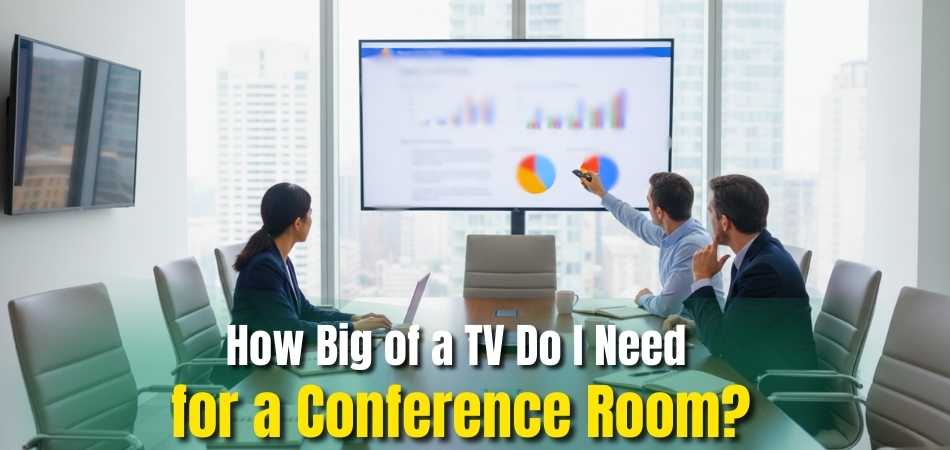
Choosing the right TV size makes a big difference in meeting rooms. It helps everyone see clearly and stay focused on what’s on the screen. Picking the correct size also makes presentations and video calls look more professional. Let’s look at the best sizes for small, medium, and large rooms below.
Small Conference Rooms
In small meeting spaces with up to six seats, a TV between 43 and 55 inches works best. These rooms usually have a viewing distance between 4 and 10 feet. This size gives clear visuals for video calls and simple slides. It’s a good choice for quick discussions or project updates.
Medium Conference Rooms
For mid-sized rooms that hold around 6 to 12 people, a 65 to 75-inch TV fits well. These rooms have viewing distances between 10 and 16 feet. This size makes text and charts easier to see from anywhere. It’s perfect for team meetings and client presentations.
Large Conference Rooms
Larger rooms that seat 12 to 20 people need bigger screens. TVs between 85 and 98 inches work well for viewing distances from 16 to 25 feet. They make sure everyone can see slides, data, and videos clearly. These screens are great for training sessions or company-wide updates.
Easy Size Formula
A simple way to choose your TV is to measure the room. The TV height should be about one sixth of the distance from the farthest viewer. This rule helps people read text and details easily without squinting. It’s a quick guide before picking your display size.
The Professional 4 / 6 / 8 Screen Size Rule (AV Standard)
Professional AV designers often use the 4 / 6 / 8 rule to choose the right screen size based on what people view on the screen.
- Divide by 4: For detailed content like Excel sheets, financial data, or engineering drawings
- Divide by 6: For standard presentations, documents, and mixed content
- Divide by 8: For video calls or watching videos where text is minimal
Measure the distance to the farthest seat in feet and divide it by the number above. The result is the minimum screen height needed for clear viewing.
This sizing method is commonly used by professional AV designers and follows guidance from industry organizations such as AVIXA and commercial AV integrators.
Conference Room TV Size Chart
Here’s a quick chart to help match the viewing distance with the right TV size. For 4 to 6 feet, go for 43 inches. For 6 to 9 feet, pick 50 to 55 inches. From 9 to 12 feet, 65 inches works best. Between 12 and 20 feet, choose 75 to 85 inches, and go up to 98 inches for 25 feet.
Choose a Bigger Screen for Text-Heavy Content

Not all meetings need the same screen size.
- Spreadsheets and reports need larger screens so small text stays readable
- Presentations and slides work well with standard sizing
- Video calls and videos can use slightly smaller screens
If your team often reviews numbers, charts, or documents, it’s safer to choose one size larger than the minimum recommendation.
Light and Room Setup
Room lighting affects screen visibility more than people think. Bright rooms may cause glare, so go for brighter displays or anti-glare screens. Make sure the TV is mounted at eye level for better viewing comfort. Check wall space before buying to avoid installation issues.
Smart Features to Consider
Modern TVs come with built-in smart features that help with meetings. Look for models that support wireless screen sharing and video call apps. These features make it easier to connect laptops or mobile devices. It saves time and keeps meetings running smoothly.
Detailed Conference Room TV Size Reference Table
Here is a simple chart that matches viewing distance to recommended TV size:
| Viewing Distance | Suggested TV Size |
| 4 to 6 ft | 43 inches |
| 6 to 9 ft | 50 to 55 inches |
| 9 to 12 ft | 65 inches |
| 12 to 15 ft | 75 inches |
| 15 to 20 ft | 85 inches |
| 20 to 25 ft | 98 inches or dual screens |
This chart gives a good starting point. If your team looks at detailed spreadsheets or tiny text, go a bit larger.
Picking the right TV size depends on your room size and viewing distance. Always measure first, and follow the one-sixth height rule for clarity. Go for a 4K display to make text and visuals crisp and easy to read. With these tips, your next meeting or upcoming conference will look clear and professional.
Why Does Screen Height Matter More Than TV Size?
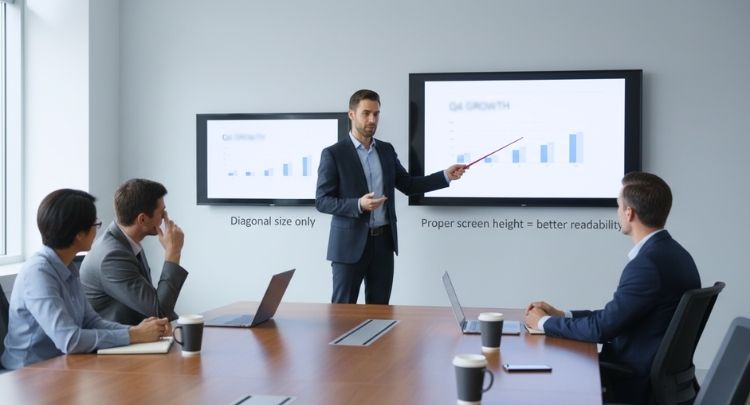
When choosing a TV, most people look only at the size written on the box. But real viewing comfort depends more on screen height than diagonal size. Screen height decides how clear text and details look, especially from a distance.
1. TV Size Is Just a Diagonal Number
TV size is measured from one corner to the opposite corner. This number sounds big, but it does not show how tall the screen is. Two TVs with the same size can feel very different because diagonal size does not control how large text or details appear.
2. Screen Height Affects Readability
Screen height decides how easy it is to read text, subtitles, and small details. A taller screen makes letters and images clearer, especially when you sit far away. Even a wide TV can feel hard to read if the height is too small.
3. Same Size TVs Can Have Different Viewing Comfort
Two TVs with the same diagonal size can have different screen heights because of how the screen area is used. One may feel clearer and more comfortable simply because the screen is taller. This is why size alone can be misleading.
4. Why Professionals Choose Screen Height First
AV professionals first calculate the screen height based on viewing distance and content. After that, they select a TV size that matches this height. This method ensures better visibility, less eye strain, and clearer viewing for everyone.
TV size tells how big a screen sounds, but screen height tells how useful it is. Focusing on height first helps you choose a screen that is easier to see, read, and enjoy in real use.
Commercial TV vs Regular Home TV: What’s the Difference?
At first glance, commercial TVs and regular home TVs may look the same. But they are built for very different uses. This table shows why choosing the right type of TV matters in office and meeting room settings.
| Feature | Commercial TV | Regular Home TV |
| Designed Usage | Built for offices, meeting rooms, and business spaces | Made for home entertainment only |
| Daily Run Time | Can run many hours every day without issues | Designed for limited daily use |
| Brightness Level | Higher brightness for well-lit rooms | Lower brightness, best for dim rooms |
| Glare Control | Better screen coating to reduce reflections | More glare under office lighting |
| Durability | Built for long-term and heavy use | Wears out faster in office use |
| Warranty Coverage | Warranty supports business and office use | Warranty may be void in commercial use |
| Control Features | Supports remote management and scheduling | Limited control options |
| Cost | Higher upfront cost | Lower upfront cost |
| Long-Term Value | More reliable and cost-effective over time | May cost more due to repairs or replacement |
A regular home TV may save money at the start, but it can create problems over time. Commercial TVs are made for daily business use, better visibility, and long life, making them a safer choice for professional spaces.
Conference Room TV Budget Guide: What to Expect?
If you’re planning to buy a TV for your conference room in Bangladesh, here’s a quick idea of what prices look like right now:
TV Price Ranges
- Entry-level (43-inch 4K TVs): Around $300–$390
Good for small rooms and simple meetings. - Mid-size (55–65 inch 4K Smart/QLED TVs): Around $640–$1,180+
A solid choice of size and quality for medium rooms. - Large (75–85 inch or bigger): Around $1,635–$2,725+
Best when many people watch slides or video in a big room.
Which Size Works for Which Room
- Small rooms: A 43–55 inch 4K TV — budget friendly and enough for a few viewers.
- Medium rooms: A 55–65 inch Smart/QLED TV — better visibility and clearer picture for more people.
- Large rooms: A 75–85 inch TV (or larger) — ensures everyone can see clearly, even from far seats.
Example TVs for Different Budgets
| TV Model | Best For | About Price (USD) |
| Samsung 43″ Crystal UHD 4K Smart LED TV | Small rooms | $300–$390 |
| Samsung 55″ 4K UHD Smart LED TV | Medium rooms | $640–$800 |
| Samsung 65″ QLED 4K Smart TV | Medium to large rooms | $900–$1,180 |
| TCL 75″ 4K QLED Smart TV | Large rooms | $1,635–$2,000 |
| Samsung 85″ QLED 4K Smart TV | Very large rooms | $2,200–$2,725+ |
| Hisense 75″ 4K QLED Smart TV | Large rooms (budget-friendly) | $1,635–$1,900 |
What to Think About When You Plan Your Budget
- Size of the room and how far people will sit from the TV: Big rooms need large screens so everyone can see clearly.
- What you’ll use the TV for
- Video calls or simple presentations: mid-range TVs are enough.
- Detailed slides, charts, text-heavy content: go for bigger screen or higher resolution.
- Plans for future growth: If you expect bigger meetings later, it’s smart to invest in a larger or higher-quality TV now.
- Useful extra features: Smart functions, high brightness (for bright rooms), slim design, and wall-mount capability may add cost but make the TV more useful.
Best TV Placement: Mounting Height and Viewing Angle Tips
Choosing the right TV height makes meetings more comfortable for everyone. When the screen is too high or too low, it can cause neck strain. Setting the right angle also helps people see clearly from every seat. Let’s go over simple tips to find the best height and angle for your setup.
Ideal TV Mounting Height
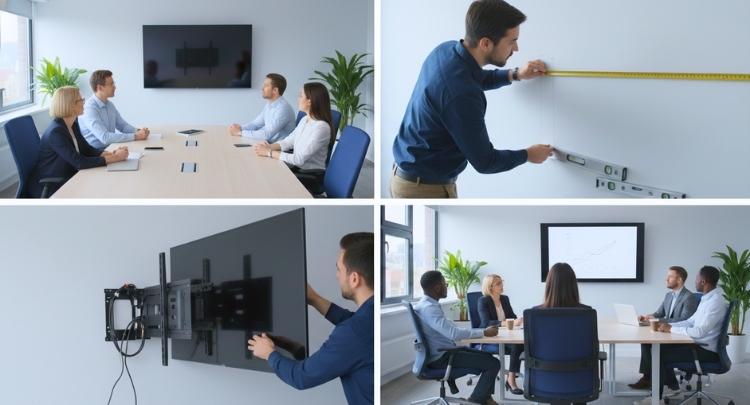
Most experts suggest placing the screen’s center at seated eye level. This is usually between 40 and 50 inches from the floor. For many rooms, 42 inches (about 107 cm) is a great start. It keeps the view natural and reduces the need to tilt your head.
Adjusting for Room Size and Seating
When people sit farther away, a slightly higher position can help. Just don’t raise it too much, or it becomes uncomfortable. The key is keeping the center close to your eye line. Measure from the floor to where your eyes naturally rest while seated.
Considering Furniture and Obstacles
Make sure the bottom of the screen stays above tables and laptops. This helps everyone see the display clearly during meetings. If the screen is too low, people in the back might lose visibility. A bottom height between 36 and 40 inches usually works best.
Setting the Perfect Viewing Angle
Keep the screen nearly straight in front of viewers. A slight tilt can help if the room is large or seating is spread out. Avoid sharp tilts that force people to look up or down. This small detail makes a big difference in comfort and clarity.
Easy Steps for Setup
Sit where most viewers will be during meetings and measure your eye height. Divide the TV’s height by two to find its center. Mount the TV so this point matches your eye height. When deciding the conference room monitor mounting height, it’s best to align the screen’s center slightly above eye level to ensure comfortable viewing for everyone in the room and prevent neck strain during long meetings.
Setting up the TV at the right height makes your meetings smoother. Everyone can focus better when the screen feels natural to watch. Take a few minutes to measure before mounting your display. These small steps help create a more comfortable and professional setup.
Camera and Soundbar Placement for Video Meetings
In today’s conference rooms, video meetings are part of daily work. How the camera and soundbar are placed can change how natural and comfortable a meeting feels. Good placement helps people stay engaged and makes eye contact feel more real.
Keep the Camera Near Eye Level
The camera should sit close to eye level. This means placing it just above or just below the screen. When the camera is near where people look, faces line up naturally and eye contact feels normal.
If the camera is too low, people look down. If it is too high, people look up. Both feel awkward during a call.
Why Soundbar-Camera Combos Work Well
Many teams use soundbar and camera units combined into one device. These are often mounted under the TV.
This setup works well because:
- The camera stays close to faces on the screen
- Sound comes from the same direction as the video
- The setup looks clean and professional
When people look at the screen, they also look near the camera.
Avoid Placing the Camera Too High
Mounting the camera high above the TV is a common mistake. This creates a top-down angle that feels unnatural to people on the call.
Problems caused by high placement:
- Poor eye contact
- Less personal connection
- Tired or uncomfortable viewing
Keeping the camera closer to the screen fixes this.
Better Placement Means Better Meetings
Good camera and soundbar placement improves:
- Eye contact
- Attention and focus
- Natural conversation flow
Small placement changes can make hybrid meetings feel more human and less tiring. When faces, voices, and screens align, meetings work better for everyone.
How Conference Room Lighting and Glare Affect TV Size and Clarity?
Lighting in a conference room changes how clear your screen looks. Too much light or glare can make it hard to read text or see details. Picking the right screen size and brightness helps everyone view content easily. Let’s look at how lighting affects your choice of TV and setup tips below.
Small Screens Need Light Control
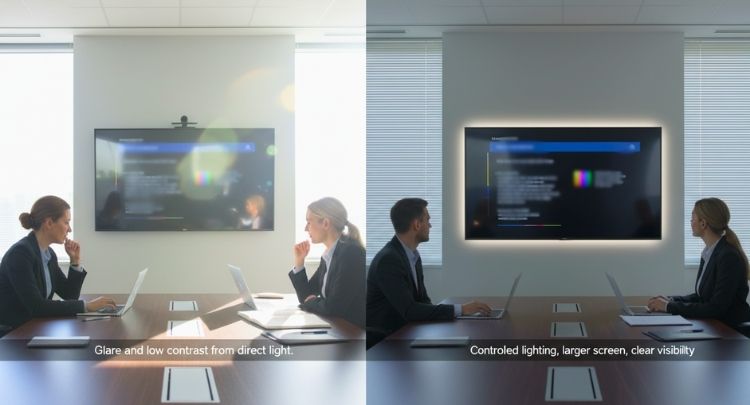
If you use a smaller TV, such as 43 to 55 inches, keep the light under control. Strong sunlight or overhead lights can create glare and reflections. This makes it hard to read slides or charts. Try adding curtains or blinds so your screen stays easy to see.
Bigger Rooms Need Brighter Screens
Large rooms with strong light need larger and brighter screens. When people sit far away, small TVs look dim and unclear. A screen between 85 and 98 inches with high brightness helps. It makes sure everyone can see clearly, even in bright spaces during the upcoming conference.
Bright Rooms Need the Right Panel Type
In bright or mixed-light rooms, the display type is very important. TVs with strong backlights and high contrast work better here. Anti-glare or matte screens also reduce reflections. These features keep the image clear even with light coming from windows or overhead lamps.
Avoid Direct Light on the Screen
Never place the TV where sunlight or ceiling lights hit it directly. Direct light causes reflections that block what’s on the screen. If possible, move the screen or adjust the light angle. This keeps the picture visible from every seat in the room.
Use Curtains or Diffused Lighting
Cover windows with blinds or curtains to block strong sunlight. Choose soft, indirect lights instead of harsh spotlights. These steps help control brightness and reduce glare. They make both the room and the screen more comfortable for long meetings.
Pick the Right Screen Brightness
Choose a TV with enough brightness and contrast for your room. Bright rooms need displays that can stay clear under mixed lighting. If you work in changing light, such as rooms with windows, brightness becomes even more important. This helps the image look sharp all day long.
Try Anti-Glare or Matte Screens
Screens with anti-glare or matte finishes reduce reflections well. These types are best if your room has natural light. They make text and visuals easier to read without straining your eyes. A matte display can make a big difference in comfort and clarity.
Add Soft Light Behind the Screen
Adding bias lighting, which is soft light behind the TV, helps reduce eye strain. It also makes the picture look more balanced and natural. This is an easy way to improve comfort during long meetings. It keeps focus on the screen, not on harsh room lighting.
When choosing a TV for your meeting space, look at more than just size. Think about how bright the room is and how light hits the screen. Bigger, brighter displays work best for bright rooms, while smaller screens need careful light control. With the right setup, your next meeting or upcoming conference will look sharp and clear for everyone.
Real Examples of Conference Room TV Sizes and Setups
Setting up a conference room TV is easier when you see real examples. You can notice how screen size, lighting, and furniture work together. Each setup shows what makes a room look clean and easy to use. Let’s go through some real setups so you can plan your own room better.
Modern mid-size conference room with wall-mounted TV
- This setup shows a medium-sized room: a table with chairs around, and a wall-mounted TV.
- The TV is placed so everyone seated around the table can view it easily. Light from windows appears controlled (curtains or glass walls), which helps reduce glare.
- Good for teams of ~6–12 people.

Large conference room / boardroom with big screen
- This example shows a bigger room with a longer table and a large screen TV on the wall. Good for bigger meetings or many participants.
- The TV size is proportionate to room — it’s big enough for people at the far end of table to see presentation slides or videos clearly.
- The placement is central and elevated enough so even people seated far away get a clear view.
Compact / small meeting room with smaller wall-mounted TV
- Here you see a small meeting room — maybe 4–6 seats — with a modest-sized TV.
- The screen is close to the seating area, so a smaller size still gives good visibility.
- This works well when few people attend and the room is small: easier to manage lighting, glare, and mounting height.
What These Examples Show About Good Setup Practices
From these real setups, a few clear patterns stand out:
- Screen size matches the room size: Bigger rooms need bigger TVs; smaller spaces do well with compact screens.
- Central wall placement is key: Mounting the TV at the right height and center helps everyone see comfortably.
- Lighting is managed carefully: Curtains, blinds, or glass walls are used to reduce screen glare.
- Furniture supports visibility: Tables and chairs are arranged so everyone has a clear view without obstacles.
TV vs Projector vs LED Display Wall for Conference Rooms
Choosing the right display for a conference room can feel confusing because each option works better in different situations. The table below gives a clear side-by-side look at TVs, projectors, and LED display walls so you can quickly understand which one fits your meeting space and needs.
| Feature | TV | Projector | LED Display Wall |
| Best Room Size | Small to medium rooms | Medium to large rooms | Medium to very large rooms |
| Brightness in Lit Rooms | Very good | Weak unless lights are dimmed | Excellent even in bright rooms |
| Image Quality | Sharp and clear | Depends on lighting, usually softer | Very sharp, bright, vivid |
| Screen Size | Limited (up to about 85 inches affordably) | Very large sizes possible | Very large sizes possible |
| Setup and Installation | Easy and quick | Needs ceiling mount and alignment | Professional installation needed |
| Portability | Not portable once mounted | Can be portable | Not portable |
| Maintenance | Low | Bulb replacement and cleaning needed | Low to medium |
| Cost | Moderate | Low to moderate | Highest upfront cost |
| Long Term Use | Good for daily meetings | Good for occasional big presentations | Excellent for heavy daily use |
| Looks and Style | Simple and clean | Traditional setup | Modern and premium look |
Each display type has its own strengths, so the best choice depends on your room size, lighting, and how often you plan to use the system. When you combine the right display with smart tools like using webcams in conference rooms, your meetings become clearer, more organized, and easier for everyone to follow.
When Is an Interactive Display a Better Choice Than a TV?
Some meetings need more than screens that only show shared content. Teams often need tools that support ideas, notes, and live interaction. This is where interactive displays offer clear advantages over standard TVs. The sections below explain when choosing an interactive display makes better sense.
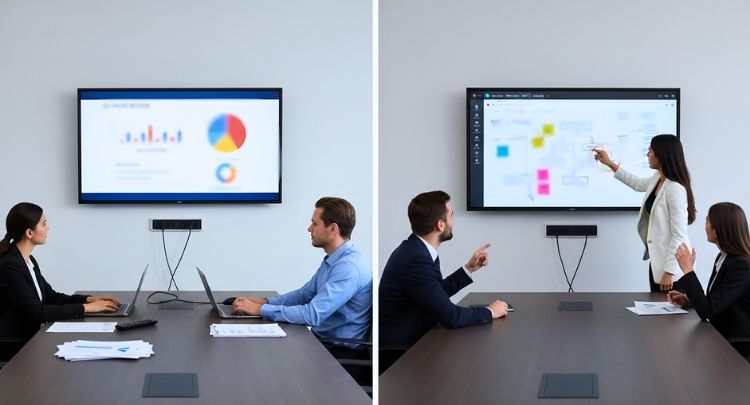
Supports Real Time Collaboration
Interactive displays let users write, draw, and move content on screen. This helps teams share ideas faster during meetings. Notes stay visible to everyone in the room and remote callers. A regular TV cannot support this kind of hands on teamwork. It keeps meetings active instead of quiet and one sided.
Works Well For Brainstorming And Training
During brainstorming sessions, people think better when they can see ideas grow. Trainers can explain topics while writing notes beside shared content. This makes learning clearer and easier to remember. TVs only show slides, but interactive displays support thinking together in real time. It also helps shy team members share thoughts visually.
Better Control During Hybrid Meetings
In hybrid meetings, some people join from rooms, others join remotely. Interactive displays let anyone control content directly on screen. Teams can scroll, mark points, and adjust files live. With platforms like Zoom Rooms or Microsoft Teams Rooms, collaboration feels more natural. Everyone stays involved instead of watching silently.
Reduces Extra Tools And Devices
Using a TV often needs extra tools like laptops or whiteboards. Interactive displays combine screen, writing surface, and control in one place. This reduces setup time and confusion before meetings. Fewer devices also mean fewer technical issues during important discussions. Teams can start meetings faster and stay focused.
When A Standard TV Is Not Enough
If meetings only show videos or slides, a TV works fine. But when teams need input, writing, or quick changes, limits appear. Interactive displays remove these limits by allowing direct action. This makes them a better fit for active and creative meetings. They support teamwork instead of passive viewing.
Choosing the right display depends on how your team works daily. If meetings need sharing ideas, interactive screens offer clear benefits. TVs are fine for viewing, but not for real collaboration. Think about your meeting style before deciding which display fits best.
Common Questions About Conference Room TV Sizes
Picking the right TV for your conference room can bring lots of small questions. People often wonder about placement, picture quality, screen type, or setup needs. This section answers the most common questions in a simple way so you can plan better. Read below to find quick and clear answers that make your choice easier.
What Resolution Is Best for a Conference Room TV?
A 4K TV is the best choice for most conference rooms today. It gives clear text and detailed visuals that help during meetings or presentations. Lower resolutions like Full HD can look blurry from a distance. A 4K screen makes charts, slides, and video calls look sharp and professional.
Is a Smart TV Important for Conference Room Use?
Yes, a smart TV helps make meetings smoother and faster to start. You can use built-in apps for video calls or share screens without extra wires. This saves time and reduces setup problems during meetings. A smart TV also supports Wi-Fi connections, which makes it easy to connect laptops and phones.
Can I Use a Regular Home TV in a Conference Room?
You can, but it may not always be the best idea. Home TVs are built for shorter viewing distances and lighter use. In conference rooms, they may not be bright enough or big enough for everyone to see. If you use one, make sure it’s large and bright enough for your room size.
How High Should I Mount the TV on the Wall?
The best height is when the center of the TV is at seated eye level. This usually means about 40 to 50 inches from the floor to the screen center. Mounting it too high can cause neck strain for viewers. A level view keeps everyone comfortable and focused during long meetings.
What Type of TV Panel Is Best for Bright Rooms?
In bright rooms, QLED or LED TVs with high brightness work very well. They show clear pictures even when sunlight or ceiling lights hit the screen. OLED screens look great too but may reflect more light. Anti-glare or matte screens are also helpful for rooms with lots of windows.
Final Words
Choosing the right screen makes a big difference in how your team works and communicates. The best size depends on your room layout, seating distance, and how clear you want the visuals to be. A simple rule is to match the screen to the space, so everyone can see easily. Now you know the answer to how big of a TV do I need for a conference room.
Before buying, check the lighting, viewing angle, and mounting height to get the best result. Measure carefully, control glare, and go for a bright screen in well-lit rooms. Always pick a size that fits your meeting space best. Good luck creating a setup that keeps every meeting clear, sharp, and comfortable!