Canada visas are one of the most applied-for travel documents each year. After completing the biometric step, many applicants start waiting for the next update. It’s natural to wonder about what comes next or even think, can I track my application after biometrics Canada visa?
Yes, you can track your Canada visa application after biometrics. Use your IRCC secure account to see biometrics, medical, background, and eligibility updates. If you submitted through VFS Global, use the VFS Tracking ID to track passport movement only. Full status updates appear after you receive your AOR (Acknowledgment of Receipt).
Do you want to know how to check every step of your Canada visa progress easily? Keep reading, because this article explains each tracking method, how long updates take, and what to do if your file shows no changes for a while.
Can I Track My Application After Biometrics Canada Visa?
After finishing your biometrics for a Canada visa, many people wonder what comes next. It’s important to know how to track your application so you can see updates and prepare for your travel plans. The steps below explain how to check your visa status easily.
Step 1: Sign In To Your IRCC Account
Start by signing in to your IRCC secure account using GCKey or Sign-In Partner. This is where you’ll see all updates and messages about your visa. If you applied on paper, link that file to your account. It helps you view real-time updates in one place.
Step 2: Make Sure You Have Your AOR
Before tracking your visa, wait for your AOR (Acknowledgment of Receipt). This letter confirms IRCC has officially received your file. Once you get it, you can check progress online. If it’s not yet available, wait for a few days before trying again.
Step 3: Check Biometrics Completion Status
Log into your IRCC tracker and confirm that biometrics are marked “Completed.” This means your information was received and added to your application. You’ll also see messages if IRCC needs extra documents. Always keep an eye on this section for new updates.
Step 4: Use VFS Tracking If You Applied Through A VAC
If you submitted your application through a Visa Application Centre, go to the VFS tracking website. Enter your tracking ID and date of birth. Select your country page where you submitted your biometrics to access the correct VFS tracking system. This lets you see your passport’s movement between the VAC and the embassy.
Step 5: Understand The Status Lines Clearly
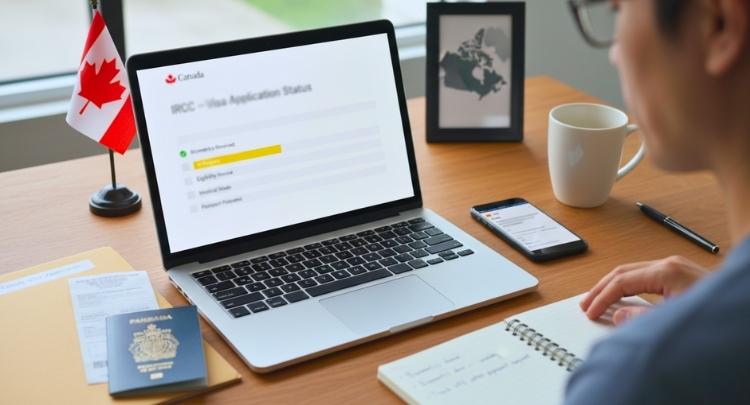
Each line in the tracker shows a stage like medical check, background review, or eligibility test. Read the notes carefully to understand what they mean. If IRCC needs more details, it will be mentioned there. This helps you stay informed about your file’s position.
Step 6: Link A Paper Application If You Mailed It
If you mailed your visa application, go to your IRCC account and choose “Link an Application.” Once connected, you’ll receive all updates digitally. You can view messages, documents, and progress details in one dashboard. This makes tracking simple and faster.
Step 7: Use Processing Time Info For Expectations
Go to IRCC’s processing time page to see the average review period. This helps you plan your travel dates or attend upcoming events like conferences in Canada. The timeline is only an estimate, but it helps you stay prepared for visa results.
Tracking your Canada visa after biometrics is simple when you know the steps. Always wait for your AOR before checking updates online. Use both your IRCC and VFS accounts for the most accurate progress reports. With patience and attention, you’ll stay informed until your visa is approved.
What You’ll Need
- IRCC account login (GCKey or Sign-In Partner).
- Application number and/or UCI when linking or checking status.
- VFS Tracking ID and your date of birth (if tracking via VAC).
Important: Application Number vs UCI vs VFS Tracking ID
Many applicants get confused because Canada uses different numbers for different tracking tools. Each number works in a specific place.
- Application Number: This is used inside your IRCC account and the Application Status Tracker. It usually starts with letters like V, S, or W and is found in your Acknowledgment of Receipt (AOR) email.
- UCI (Unique Client Identifier): This is your personal ID with IRCC. You may already have it from a past visa. It is also used for linking applications and registering for the status tracker.
- VFS Tracking ID: This is only for VFS Global. It is printed on the receipt you receive after biometrics or passport submission. It tracks passport movement only, not visa approval.
Using the wrong number in the wrong system will show no result, so always match the number to the correct platform.
Three Official Ways to Track Your Canada Visa After Biometrics
Canada does not use one single tracking system. Instead, different tools are used at different stages. Knowing which one to use saves time and stress.
Method 1: IRCC Secure Account (GCKey or Sign-In Partner)

Best for:
- Seeing biometrics status
- Medical exam updates
- Background and eligibility checks
- Reading messages from IRCC
Log in to your IRCC account and open your submitted application to see detailed progress lines.
Method 2: Application Status Tracker (Timeline View)
Best for:
- Seeing a simple progress timeline
- Checking key stages at a glance
This is a separate IRCC tool that requires registration using your UCI and Application Number. It does not replace your IRCC account but gives a cleaner timeline view.
Method 3: VFS Global Tracking
Best for:
- Tracking passport movement only
Use the VFS Tracking ID from your receipt to check when your passport is sent, stamped, or ready for pickup. This does not show visa approval details.
Canada Visa Application Timeline After Biometrics
The visa steps can feel slow when you wait for news. Each update tells you the file is moving ahead in order. You get clear signs once checks and other reviews start to change. Keep reading below to see simple details for every step.
Biometrics Linking Time
Your details reach IRCC soon after the appointment, so updates appear fast. Many people also finish applying for biometrics for Canada early since this step starts checks. Once linked, the file moves to the next review stage without any action needed. Some see changes that same day while others wait a short while. It depends on the visa office handling your case.
Eligibility And Background Checks
This stage can take a short time or stretch longer for some. Visa type, your home country and extra review steps can change the pace. IRCC checks your info to confirm your purpose and details. You might see no updates during this wait. It is normal and does not show any problem.
Medical Exam Review
Clinics often upload results within two weeks although IRCC may need longer. Your account should update within a month from the exam date. This step checks if your health meets the rule for your visa type. You might notice a simple “passed” line once done. No action is needed after the clinic sends results.
Decision And Passport Request
A final review happens once all checks are done in your file. You get a decision letter and a passport request if approved. These letters appear inside your IRCC account. Read both letters with care because they explain your next steps. You must follow the steps to avoid small delays.
Passport Submission And Return
VFS asks you to send your passport within the stated time. Most offices finish stamping within one to three weeks. The timing may change if your area has many files. You can track return progress on the VFS site. Check often so you know when the passport is ready.
The full time for a visa depends on your stream and location. IRCC gives updated times that show how long new files may take. These times already include the step linked to biometrics. Keep checking the tool so you know what to expect next.
Tracking Differences for Canadian Visitor Visa, Study Permit, Work Permit, and PR
Many people want to track their Canada applications with less stress today. Each permit or visa uses a few tools that work in different ways. You can avoid mistakes when you know what each tool does best. Read the guide below to learn the steps in simple words.
Tracking Visitor Visa Updates
People check their visitor visa updates inside their IRCC online account. The page shows messages, progress notes, and any new steps needed. When a passport request comes, tracking moves to the local VFS website. The VFS page uses a tracking ID to show movement updates. This helps you follow your passport travel safely.
Tracking Study Permit Progress
Students check updates in the same IRCC account where they applied. The status tracker site does not work for people inside Canada who extend or change permit rules. A passport request sends tracking to the VFS website again. The VFS page shows updates until the passport returns. This makes the process easy to follow.
Tracking Work Permit Status
Work permit updates appear inside the IRCC online account used at the start. People inside Canada cannot use the extra status tracker tool for changes or extensions. A passport request moves tracking to the VFS site. The passport path is shown with a simple tracking number. This helps applicants stay calm while waiting.
Tracking Permanent Residence Steps
Permanent residence files show updates inside your online account under Immigration, Refugees, and Citizenship Canada (IRCC) for most programs. Some PR lines also use a separate tracker tool that IRCC keeps adding to. People outside Canada who need a visa use VFS tracking after a passport request. Those who finalize inside Canada get an eCOPR through the PR portal instead.
Small steps can make tracking your Canada file feel much more simple. You only need to know which tool works for your type. Keep your logins ready and check updates with patience. Stay calm and follow the steps, and your process will feel easier.
How Long After Biometrics Do You Usually See Updates for a Canada Visa?
After giving biometrics, many people wait to see their visa update. Some get results fast, while others wait weeks or more for changes. Each case depends on your visa type and where you applied from. Read below to understand what happens next and when updates usually appear.

When Biometrics Appear on Your File
Your fingerprints and photo are sent to the system within a few days. They connect to your visa file through your online account. Most people see “Biometrics: Completed” within 1 to 3 days. Checking once daily is enough because the status updates often happen overnight.
How Medical Exam Updates Show Up
If your visa type needs a medical exam, updates take longer. The result usually appears within 30 days from your appointment date. Some clinics upload faster, depending on the country and system used. It’s best to wait patiently and avoid repeating exams unless IRCC asks you to.
Understanding Eligibility And Background Checks
This part takes the most time in most applications. Many applicants start wondering about the next steps after biometrics for Canada visa once they complete their appointment, as this phase involves background checks, eligibility review, and document verification before an update appears on your IRCC portal. These steps can take weeks or even months depending on the case.
When a Decision Is Made
After background and eligibility checks are complete, IRCC updates your account. You’ll get a message when a final decision is ready. If it’s approved, you’ll receive a passport submission request right away. Always keep checking your IRCC portal for new messages and updates.
Tracking After Passport Request (PPR)
Once you send your passport to VFS, you can track it easily. Use the tracking ID provided when you submitted your passport. The VFS site will show each update, from receiving to dispatch. Processing time varies based on the office and your country’s workload.
Helpful Tips About Timelines
Processing time depends on where you applied and your visa type. Visitor visa results often come in a few weeks, while others take longer. The IRCC processing-time tool gives a more exact idea. It’s smart to check updates once daily to avoid confusion or stress.
Waiting for visa updates can test your patience, but staying calm helps. Most changes appear step by step as files move forward. Always use your IRCC account and the official tracking sites only. With patience and regular checks, you’ll soon see progress on your Canada visa file.
What Common Canada Visa Status Lines Mean After Biometrics?
After biometrics, many applicants worry when online status lines change slowly. These messages look confusing but follow a normal order. Each line shows a different check happening behind the scenes. Read below to understand what every update really means today.
- Biometrics: Completed: Fingerprints and photo reached the system successfully, so nothing else is needed now, and your application moves forward to other checks.
- Background Check: In Progress: Security screening and travel history review are ongoing, and this stage often stays unchanged for weeks, which is normal and does not signal problems.
- Eligibility Review: In Progress: Officers assess your travel purpose, documents, and home ties carefully to decide if your plans make sense and show clear intent to return.
- Medical Results: Passed: Health exam approval means medical checks are cleared, and this update usually appears within thirty days after your medical appointment submission.
- Final Decision: All reviews are complete at this point, and if approved, IRCC will send a passport request with next steps by email.
Status lines often stay unchanged for long periods, so patience matters. No movement usually means processing continues normally. Checking daily does not speed anything up. Wait calmly, follow instructions, and respond only if contacted later.
Why Your Canada Visa Status May Not Update After Biometrics?
Many people get worried when their Canada visa file stops updating online. This delay is normal and happens for several simple reasons. Some steps take longer, while others show updates only at certain times. Keep reading below to understand why your file may look quiet after biometrics.
Updates Begin After AOR
You will only see movement in your account after the AOR appears. This “Acknowledgment of Receipt” means IRCC has started reviewing your file. Until that moment, your tracker may stay unchanged. Once the AOR arrives, progress lines like “biometrics completed” or “review started” will start showing updates.
Other Checks Take More Time
Even after biometrics are done, many checks still remain. IRCC must complete eligibility, background, and security reviews before your file moves forward. These steps often take weeks or months. Seeing no updates for a while does not mean there is a problem. It’s part of the process timeline.
Medical Results Update Separately
If you need a medical exam, that part runs on its own schedule. It can take up to 30 days for the “Medical: Passed” status to appear. Clinics upload results directly to IRCC, and it may take time to show online. Waiting a few weeks is normal before it updates.

Old Biometrics May Still Be Used
Sometimes IRCC reuses biometrics from an older application. This can happen when your fingerprints are still valid within 10 years. Because the system already has them, your account might not show a new “biometrics received” line. This is normal and doesn’t affect your processing at all.
Check The Correct Tracking Site
Not every visa type updates in every tracker tool. Some files only show progress in your IRCC online account, not in the separate status tracker. If you applied on paper, link your file to view it online. Always log in with the same GCKey or sign-in partner.
Processing Times Still Apply
Each visa category has its own official processing window. If your file is still within that range, it’s normal to see gaps between updates. Use IRCC’s processing-time page to check your type. Waiting during this period is normal and does not mean a delay or issue.
Extra Documents Can Cause Holds
If IRCC asks for more documents, your file may pause for review. The status won’t move until you upload everything they request. Always check your messages and account notifications often. Missing a document or delay in upload can hold your progress longer than usual.
Technical Problems Can Hide Updates
Sometimes the issue is not with your file but your account. Changing your GCKey login or creating a new sign-in can unlink your file. You can reconnect it again using your application number and details. Once linked, your latest updates will appear normally again.
Simple steps to take
- Confirm you have AOR: No AOR means limited status detail.
- Check the right portal: Use your IRCC secure account to see the status and messages. Link paper applications if needed.
- Give medicals and wait up to 30 days for the update: That is normal.
- Compare with current processing times: If you are still inside the posted time, waiting is expected.
- If you get a Passport Request later, track the passport with VFS: Until you get that letter, VFS tracking will not show anything.
Seeing no update after biometrics can feel stressful, but it’s often normal. Each case moves at its own pace inside IRCC’s system. Keep checking your account regularly and follow any document requests fast. With a little patience, your next update will appear soon and clearly.
How to Check If Your Biometrics Are Still Valid?
Canada biometrics are usually valid for 10 years. If you gave biometrics before, IRCC may reuse them instead of asking again.
You can check this using the Biometrics Status Tool on the official IRCC website. You will need:
- Your UCI
- Your application details
If your biometrics are still valid, your account may not show a new biometrics update. This is normal and does not delay your visa.
What to Do If Your Canada Visa Application Status Is Not Updating?
Waiting for a visa update can feel stressful when nothing seems to move. It’s common to see no change for a few days or even weeks. Some updates show in different places depending on how you applied. Read below to see what to check and what steps you can take next.

Quick Steps to Check First
- Sign in to your IRCC secure account to see messages and updates.
- If you applied on paper, link your application online to view progress.
- Try linking only five times per day to avoid system blocks.
- Make sure your personal details match your form exactly when linking.
- Some visa types also use an Application Status Tracker for progress updates.
- If your program is not listed, continue checking only your IRCC account.
- Review official IRCC processing times for your visa type on the website.
- Long gaps are normal if your file is still inside the expected timeline.
If You Are Outside Normal Time or Have an Issue
- Use the IRCC Web Form to send a case inquiry.
- Select “Update or ask about your application” for file concerns.
- Pick “Technical difficulties” if your account is not showing updates.
- Include your UCI, application number, and a short message about your issue.
- Attach screenshots if there is a problem viewing your status.
- Call IRCC inside Canada at 1-888-242-2100 for help.
- Use the phone menu to check your status or get support.
- Be patient since wait times can be long during busy periods.
- Request GCMS/ATIP notes for more insight.
- These notes show what has been done on your file so far.
- You can order them if you are in Canada or have a Canadian representative.
- There is a small fee for this detailed report.
When your visa status doesn’t move, it doesn’t always mean bad news. Some updates take longer or show only in certain places. Check carefully, follow the steps above, and stay calm while waiting. With patience and the right actions, your Canada visa update will appear soon.
Common Fixes That Solve “No Updates”
- Linking problems: enter names and details exactly as on your passport and your original forms. If there are no matches, check the “number of family members” tip for sponsorship cases.
- Account sign-in problems: use a supported browser, clear cache, avoid bookmarks, and if it still fails, report it through the web form under “Technical difficulties” with screenshots.
- Paper file not visible: link it to your account to start getting messages online.
- No news for weeks: IRCC says they are still processing even if you have not heard anything. They will contact you if they need more. Check processing times before sending a web form.
If you get a passport request, follow the letter and submit your passport to VFS for stamping and use the VFS tracking for return updates. Until you get that letter, VFS will not show anything for you.
Quick Template for a Web Form Message
You can copy and adjust this:
Subject: Application outside normal processing time
I am writing about my [type of application].
UCI: [##########] | Application number: [########]
Biometrics date: [DD MMM YYYY]
It has passed the current posted processing time of [X weeks/months] for this category. Could you please confirm the status and let me know if any documents are missing?
Thank you.
Submit this through the IRCC web form. If it is a technical problem (cannot link account, sign-in errors), pick Technical difficulties and attach screenshots.
Commonly Asked Questions
A Canada visa file can feel slow after biometrics, so many people ask new questions about tracking. You may want to know how to check small signs that show movement. You might also wonder what tools work best for each update. The FAQs below give simple answers so you can follow your visa progress with ease.
Can I See Ghost Updates While Tracking My Canada Visa?
Some people notice small changes in their account that appear then vanish. These are called ghost updates and they show that the system refreshed your file. They do not always mean a big step has changed yet. Still, they are a sign that your file is active inside IRCC.
Does IRCC Send Email Alerts When My Visa Status Changes?
IRCC may send an email saying you got a new message in your account. The email will not show the update, so you must log in to read it. This helps keep your private details safe. Always check your account when you get an alert, even if it looks simple.
Can I Track My Canada Visa On My Phone?
You can check your visa status using a phone browser. The IRCC account works on mobile as long as your internet is stable. You can also use the VFS site on your phone after a passport request. Many people like this because it makes checking updates easy.
Will My Tracking Stop If I Travel After Biometrics?
Your tracking will not stop if you travel after your biometrics appointment. IRCC keeps working on your file even when you are away. You only need to check your account for messages. Make sure you can access your email while you travel.
Can I Track My Visa File With Only My UCI Number?
You cannot track full updates with only your UCI number. The system needs your IRCC account to show clear progress lines. The UCI only helps confirm your identity in the system. Always sign in to your online account to see real status changes.
Why Does My Visa Status Show “Application Updated” With No Change?
This line appears when the system refreshes your page. It does not always mean a real change was made. Many people see this during busy hours. It is normal and your next real update will show in a message or progress line.
Bottom Line
Waiting for updates after biometrics can feel long, but every step has its time. You can track your Canada visa online through your IRCC account and VFS tracking system. Updates usually appear gradually as reviews finish, so the short answer to can I track my application after biometrics Canada visa, is yes.
To make the process smoother, always check the right tracker, keep your documents ready, and stay within expected timelines. Avoid unnecessary worries by reviewing updates only once daily. With patience, you’ll soon see progress on your application. Best wishes for a quick and successful visa approval ahead.